
This guide breaks down the essential features you need when evaluating supply chain management software tools, helping you choose a solution that actually solves your problems.
Why Supply Chain Management Software Matter?
The importance of supply chain management software goes beyond tracking inventory. Modern software operations eliminates visibility gaps, automates manual processes, ensures compliance, and enables proactive decision-making across your entire network.
Supply chain management in the software industry has evolved into sophisticated platforms that connect suppliers, warehouses, carriers, and customers in real-time. These software tools reduce operational costs while improving delivery performance and customer satisfaction.
Top Features of Supply Chain Management Software
1. Real-Time Inventory Control
Supply chain inventory management software needs robust tracking across all locations. Your system should monitor stock levels in warehouses, stores, trucks, and ships simultaneously.
Look for automated reordering that triggers purchases when stock runs low. The best systems adjust these triggers based on sales patterns and upcoming promotions.
For regulated industries, serial number and lot tracking becomes mandatory. When quality issues arise, you can trace affected products instantly and execute targeted recalls.
Cycle counting features maintain accuracy without shutting down operations. The software schedules regular counts for different sections, catching discrepancies before they balloon into major problems.
2. Demand Forecasting and Planning
The capabilities of systems shine in demand prediction. Advanced algorithms analyze sales history, seasonal patterns, and market conditions to forecast future needs.
Scenario planning lets you test different strategies before committing resources. Model what happens if a key supplier fails, demand spikes unexpectedly, or new competitors enter your market.
Collaborative forecasting pulls insights from sales teams, major customers, and suppliers. This consensus approach beats pure statistical methods because it incorporates market intelligence that data alone misses.
3. Supplier Performance Management
Software must track supplier reliability. Performance scorecards measure on-time delivery, defect rates, and responsiveness to issues.
Risk assessment tools flag suppliers who pose threats to your operations—whether from financial instability, geographic concentration, or lack of backup options.
Supplier portals streamline communication. Vendors access forecasts, submit quotes, and update shipment status directly in your system, cutting email chains and phone calls.
4. Procurement Automation
Supply chain tools and techniques for procurement eliminate manual bottlenecks. Automated workflows route purchase requests through approval chains based on dollar amounts and budget availability.
E-sourcing features manage RFQs and bids digitally. Compare proposals side-by-side and award contracts based on objective criteria rather than relationships or convenience.
Spend analytics reveal purchasing patterns. You’ll spot opportunities to consolidate vendors, negotiate volume discounts, and stop unauthorized spending.
5. Transportation Planning and Execution
Logistics management software features optimize how goods move. Multi-modal planning finds the best combination of trucks, trains, ships, and planes based on cost, speed, and reliability requirements.
Carrier management tools compare rates, book shipments, and track performance across your transportation network. Freight audit capabilities catch billing errors and overcharges automatically.
Load optimization fills vehicles efficiently by considering weight limits, volume constraints, and delivery sequences. Better utilization means fewer trips and lower costs.
6. Warehouse Integration
While inventory management software handles strategic decisions, warehouse integration manages daily operations. Systems direct workers along optimal picking paths and suggest the best storage locations for incoming products.
Wave planning batches orders intelligently for release to the warehouse floor. Labor tracking identifies productivity patterns and training opportunities.
7. Cloud-Based Architecture
Cloud based supply chain software delivers flexibility that on-premise systems can’t match. Access your data from anywhere, scale up or down based on seasonal needs, and skip the hardware maintenance headaches.
Automatic updates keep you current with new features and security patches. Implementation happens faster because there’s no infrastructure to build.
8. Analytics and Reporting
SCM functionality requires strong analytical tools. Dashboards show different metrics for warehouse managers versus executives. Exception alerts notify you when performance falls outside acceptable ranges.
Predictive analytics spot trends before they become problems. Historical analysis reveals long-term patterns that shape strategic planning.
9. Order Fulfillment Management
Order promising gives customers accurate delivery dates based on current inventory and production capacity. Allocation logic prioritizes high-value orders and reserves inventory appropriately.
Drop-ship and cross-dock support offers fulfillment flexibility. Modify in-flight orders when possible to accommodate customer changes.
Returns management handles reverse logistics efficiently—from initial authorization through restocking and credit processing.
10. Global Trade Compliance
For international operations, compliance features prevent costly mistakes. Automated documentation generates commercial invoices, certificates of origin, and export declarations correctly.
Restricted party screening checks customers and suppliers against government denied-parties lists. Duty optimization analyzes different scenarios to minimize customs charges through smart classification and valuation.
11. Quality Control Integration
Elements of supply chain management include quality assurance. Track non-conformances, document corrective actions, and measure supplier quality trends over time.
Certificate of analysis management ensures raw materials and finished goods meet specifications before they move through your supply chain.
12. Financial Visibility
Top supply chain management software companies integrate financial tracking throughout. ERP connections synchronize activities with accounting for accurate costing.
Working capital optimization identifies ways to improve cash flow—whether through inventory reduction, extended payment terms, or faster collection cycles.
13. Collaboration Tools
Modern tools and techniques emphasize connectivity. Supplier portals enable self-service access to forecasts and order status. Internal messaging keeps teams aligned without endless email threads.
Document management centralizes specifications, drawings, and certificates. Workflow automation routes approvals to the right people based on business rules.
14. Mobile Access
Supply chain monitoring software supports workers wherever they are. Warehouse staff use mobile apps to scan barcodes and confirm tasks. Managers approve requests from their phones.
Executives check dashboards during meetings or while traveling. Offline capabilities let work continue in areas with poor connectivity, syncing data when connection returns.
15. Intelligent Automation
Leading software product for SCM solutions incorporate automation that learns from patterns. Demand sensing detects shifts in buying behavior faster than traditional forecasting.
Process optimization identifies inefficiencies in your workflows and suggests improvements based on what works best across similar operations.
Choosing the Right Software
When evaluating top supply chain management software vendors, focus on these critical factors:
Industry Experience: Does the vendor understand your specific challenges? Manufacturing needs differ from retail, and pharmaceutical requirements don’t match construction.
Integration Options: Your new system must connect with existing ERP, accounting, e-commerce, and warehouse platforms. Gaps in integration create data silos that defeat the purpose of unified management.
Implementation Timeline: Quick wins matter, but rushing deployment causes problems. Look for vendors who balance speed with thorough testing and training.
User Interface: Complex features mean nothing if your team won’t use them. Test the interface with actual users before committing.
Pricing Structure: Understand all costs—licenses, implementation, training, maintenance, and future upgrades. Some vendors charge per user, others per transaction volume.
Vendor Stability: Choose providers with strong financial backing and consistent product development. You’re building a long-term partnership, not just buying software.
Implementation Success Factors
Getting supply chain management software up and running requires planning:

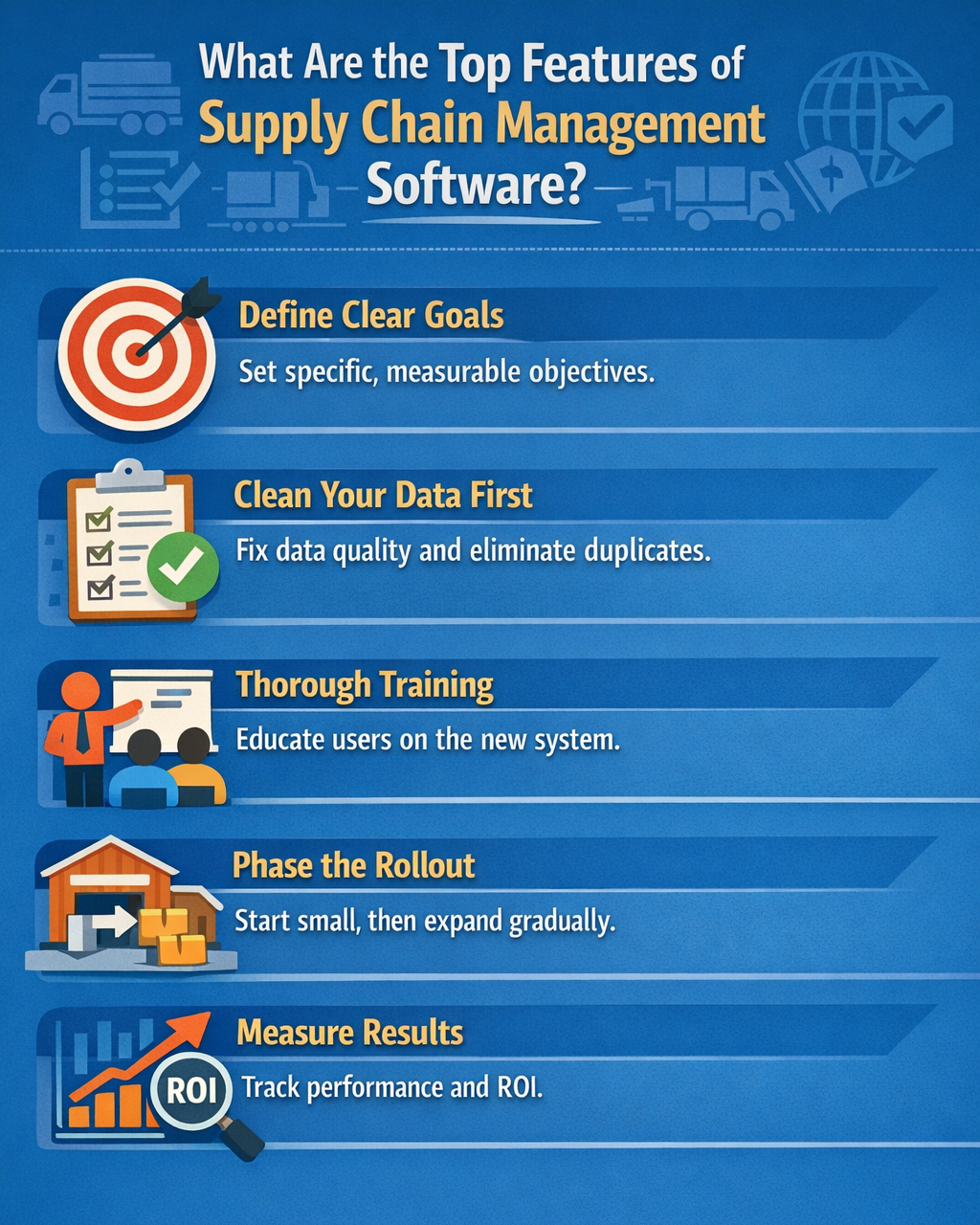
Define specific goals before you start. “Better inventory management” is vague. “Reduce stockouts by 30% while cutting inventory holding costs by 15%” gives you measurable targets.
Clean your data first. Migrating messy, inaccurate information into a new system just creates new problems faster. Fix master data, eliminate duplicates, and establish data governance before go-live.
Train thoroughly. Users who don’t understand the system will revert to old methods or find workarounds that undermine your investment.
Phase your rollout. Start with one location or business unit, prove the value, then expand. This approach reduces risk and builds internal champions.
Measure results. Track performance before and after implementation to prove ROI and identify areas needing adjustment.
Emerging Technologies Shaping Supply Chains
The capabilities of supply chain systems keep expanding:
Blockchain creates tamper-proof records of transactions and movements. Every handoff, from raw material supplier to end customer, gets recorded permanently.
IoT Sensors track location, temperature, humidity, and shock for goods in transit. Airlines already use this for pharmaceutical shipments requiring strict climate control.
Autonomous Systems from delivery drones to warehouse robots are moving from pilot projects to production environments. The software that coordinates these systems becomes part of your infrastructure.
Sustainability Tracking measures carbon emissions, water usage, and waste. Regulations and customer demands are making this mandatory rather than optional.
Making Your Decision
Start by identifying your biggest pain points. Can’t see inventory across locations? Begin with strong inventory management. Struggling with supplier performance? Prioritize vendor management features.
Small businesses often need basic inventory and order management first, adding capabilities as they grow. Mid-size companies benefit from integrated systems covering procurement through delivery. Large enterprises require extensive customization and global capabilities.
Test before you buy. Most top management software companies offer demonstrations or proof-of-concept projects. See the software work with your actual data and processes.
Final Thoughts
The importance of these management software grows as supply chains become more complex and customer expectations rise. The right software transforms reactive firefighting into proactive management.
Focus on features that solve your specific problems. Cloud based software offers flexibility and fast deployment. Strong analytics turn data into decisions. Supplier collaboration prevents disruptions. Global trade features ensure compliance.
The top features of supply chain management software outlined here give you a framework for evaluation. Match capabilities to your needs, test thoroughly, and implement methodically. Done right, the software deliver efficiency gains that flow straight to your bottom line.
FAQs
What are the advantages of using cloud-based solutions in supply chain management?
Cloud based software eliminates hardware costs, enables remote access from anywhere, scales easily as your business grows, and provides automatic updates without IT involvement. Implementation happens faster because there’s no infrastructure to build.
What role do analytics and performance measurement play in supply chain management?
Analytics transform raw data into actionable insights for decision-making. Performance measurement tracks KPIs like fill rates, on-time delivery, and inventory turns, revealing trends and highlighting problems before they escalate into crises that impact customers.
How much does supply chain management software cost?
Pricing varies widely based on features, users, and transaction volume. Small business systems start around $100-500 per month. Mid-market solutions range from $10,000-100,000 annually. Enterprise systems can exceed $500,000 in initial costs plus ongoing maintenance fees.
What are the 4 pillars of supply chain?
The four pillars are: Integration (connecting all partners and systems), Operations (managing day-to-day activities efficiently), Purchasing (sourcing materials and services strategically), and Distribution (delivering products to customers effectively). Strong management software supports all four pillars.
Relevant Guides & Services

Naveed Ahmed is the founder of Qualix Solutions, a custom software and AI solutions company helping founders and operations leaders turn complex business problems into reliable, scalable software. A former Microsoft Technical Leader with 17 years at the company, Naveed held roles spanning software development management, technical product management, data architecture, and information architecture, delivering platforms for deal management, services product data, SAP integration, and workforce skills systems.
At Qualix, he leads a distributed team building SaaS products, web and mobile applications, AI and machine learning solutions, intelligent automation, and data engineering platforms for clients across professional services, healthcare, and telecommunications. Naveed writes about custom software development, AI solutions for mid-market businesses, product strategy, SaaS architecture, and the operational realities of running a modern software company.