Redesigning NAVAIOT – Enhancing User Experience & Modernizing UI

PROJECT BY QUALIX SOLUTIONS
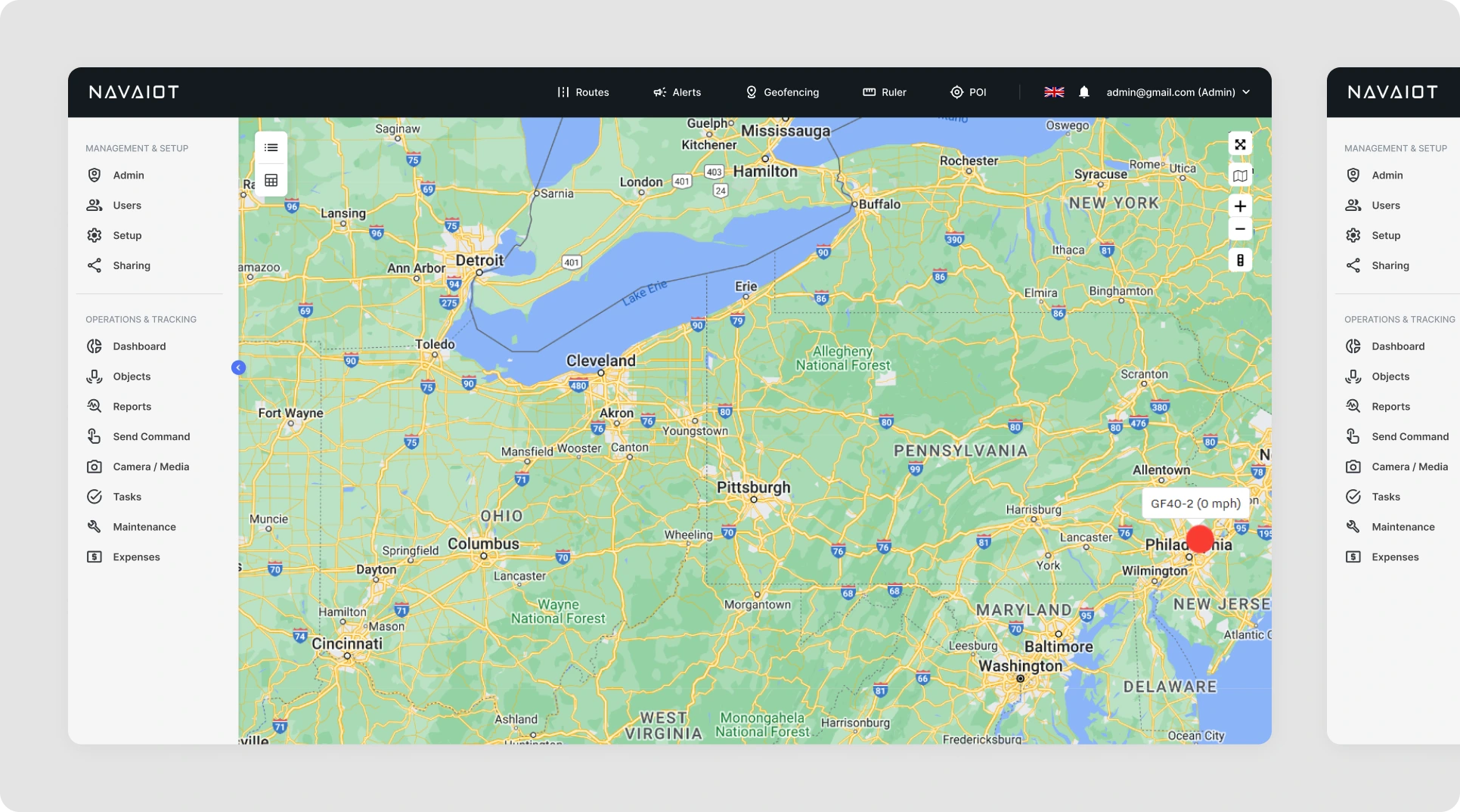
Transforming NAVAIOT: From Outdated to Modern, User-Friendly Software

NAVAIOT is a cutting-edge software solution designed to track movable devices, providing real-time updates on their locations, statuses (active, inactive, stopped, offline), and distance traveled. However, the client approached us with concerns regarding the platform’s design and usability, and sought our expertise to modernize and improve the overall user experience.

Challenges Faced by NAVAIOT

  • Problem 01: The current design of NAVAIOT was outdated and failed to attract new customers. The client needed a more modern and appealing interface.

  • Problem 02: NAVAIOT’s user experience was complicated and difficult to understand, making it challenging for users to navigate.

  • Problem 03: The software’s codebase was messy, making it difficult for developers to enhance the existing UI without facing significant roadblocks. The client also struggled to upgrade the UI due to this disorganized code structure.

Understanding Client's Requirements

When we began the project, the client’s original requirements were clear:

  • The UI must be modern and visually engaging.
  • The user experience should be simple, efficient, and easy on the eyes.
  • All old UI components should be replaced with modern design elements that align with current trends.

Creating the First Look and Feel of NAVAIOT

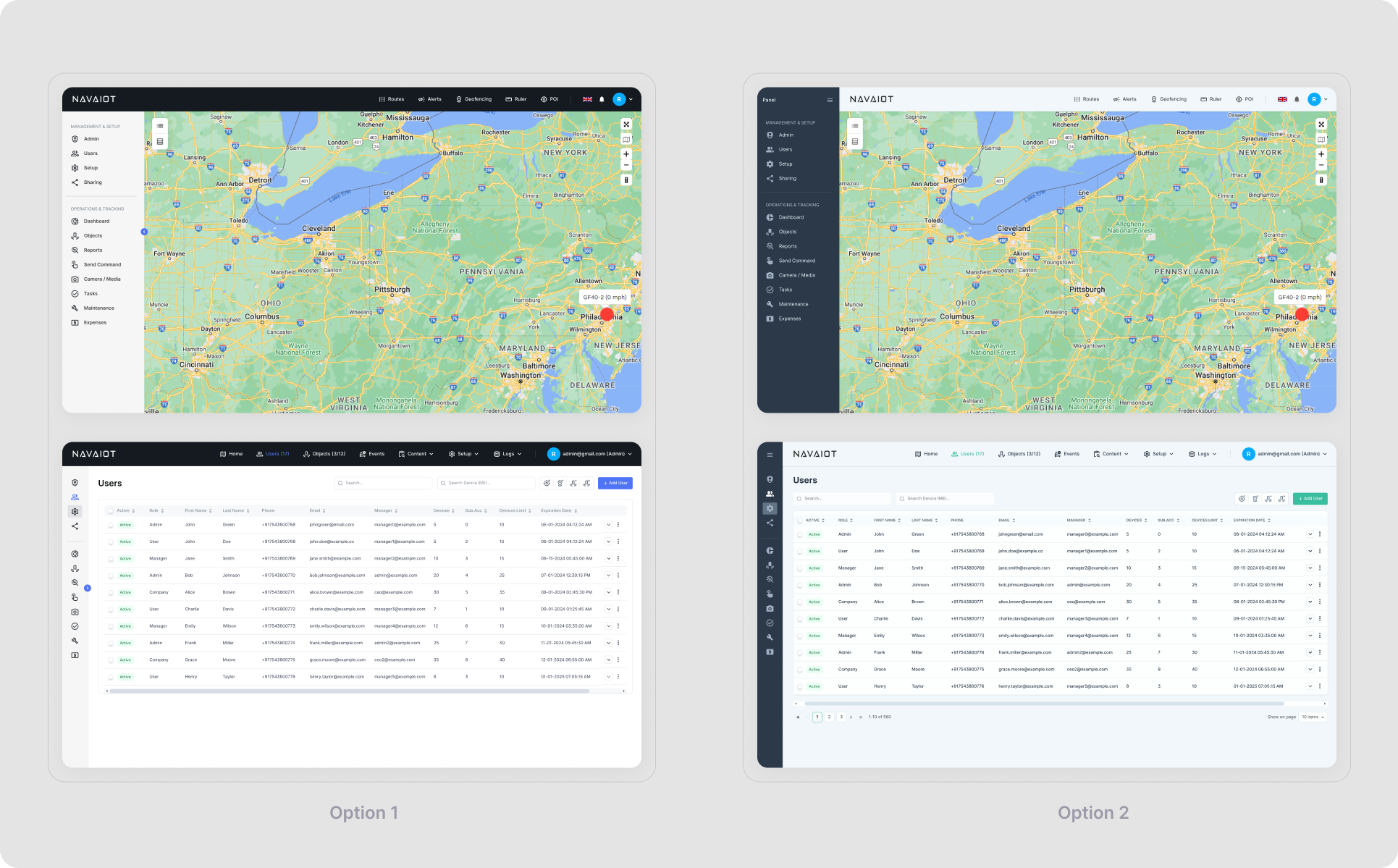
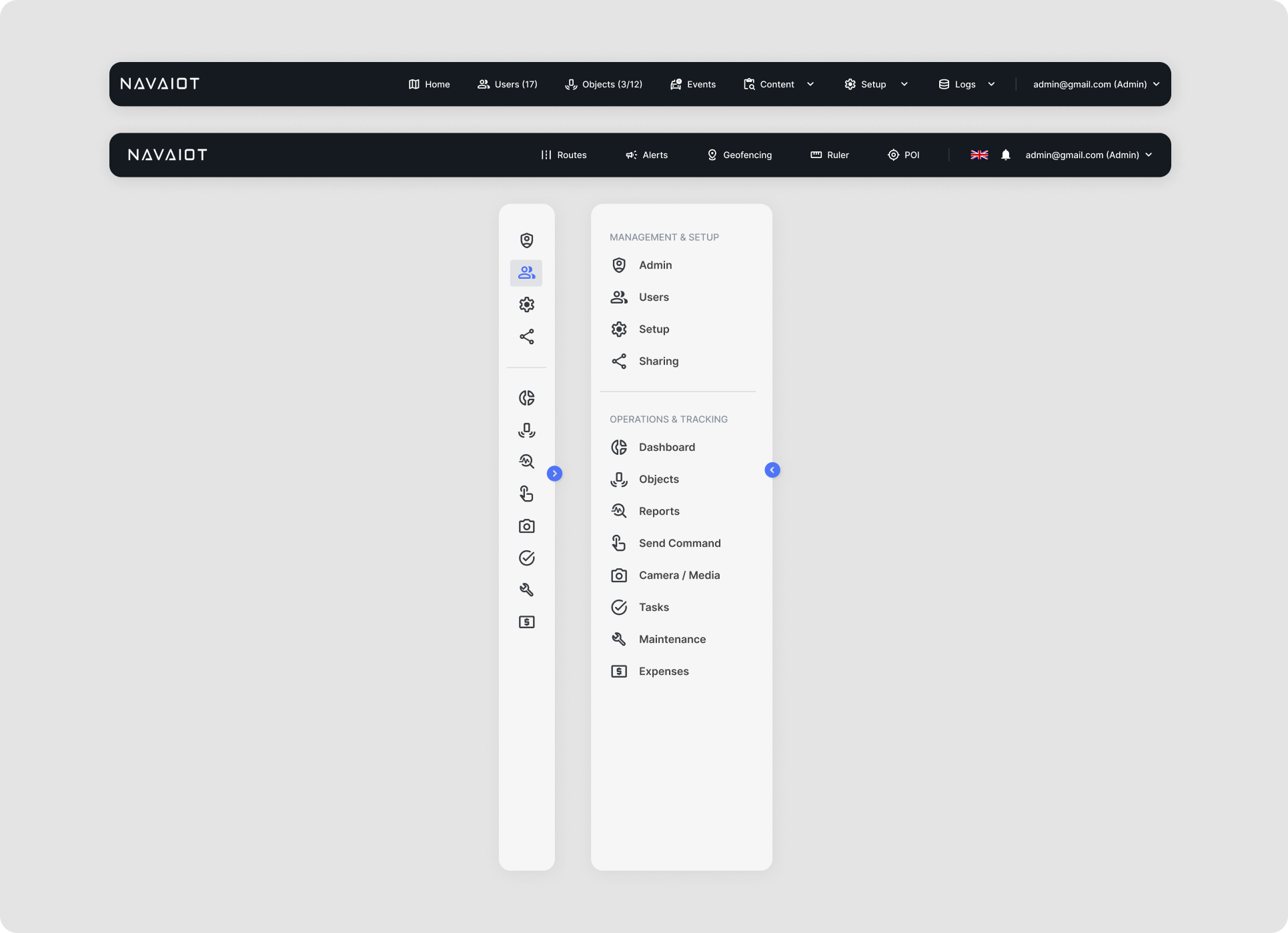
After conducting thorough moodboard creation and visual research, our UI designers developed two variations of the Home Screen and two variations of the List Views for NAVAIOT. We provided the client with these options, and they chose Option 01 as the visual direction to move forward with.
High-Fidelity Design in Figma

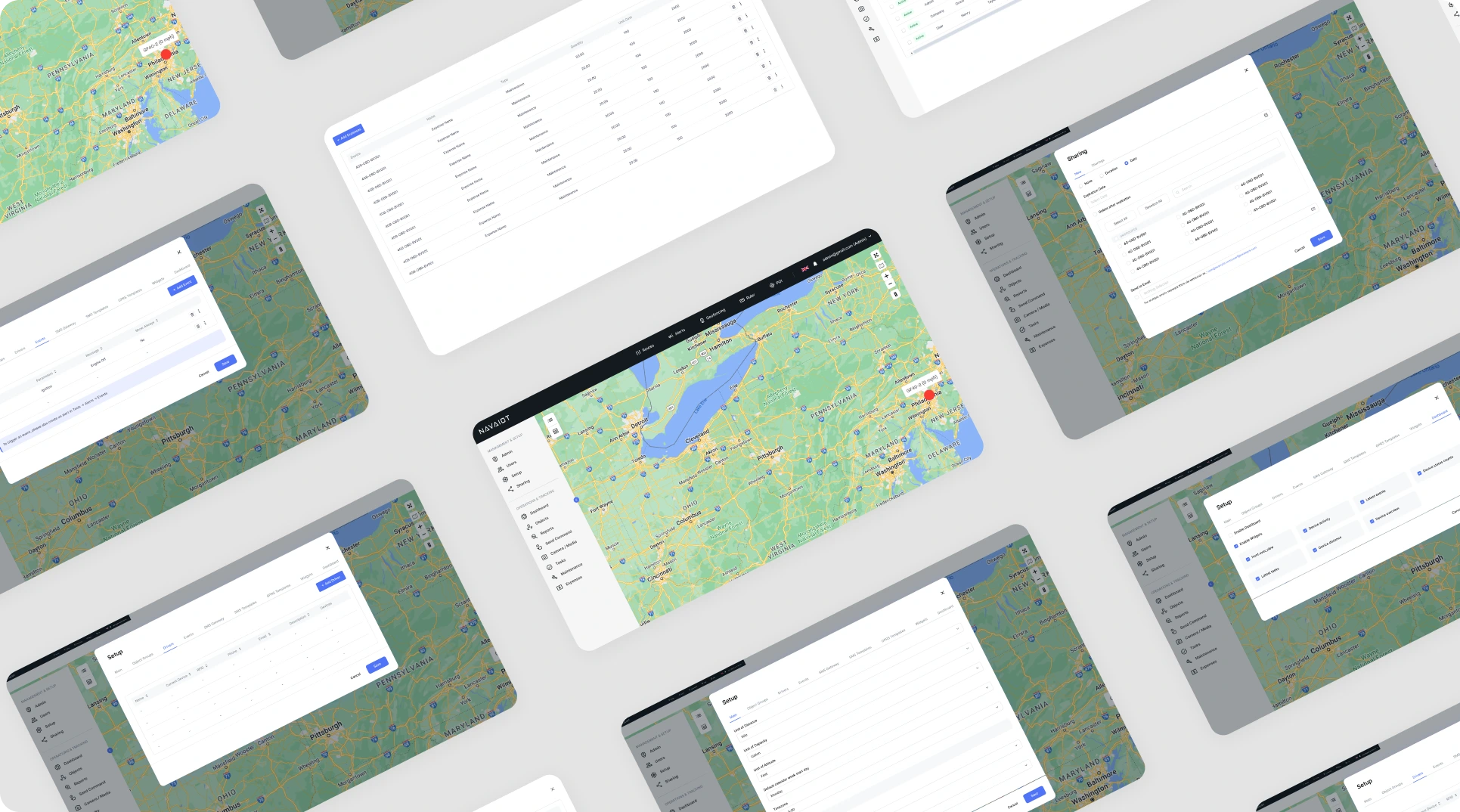
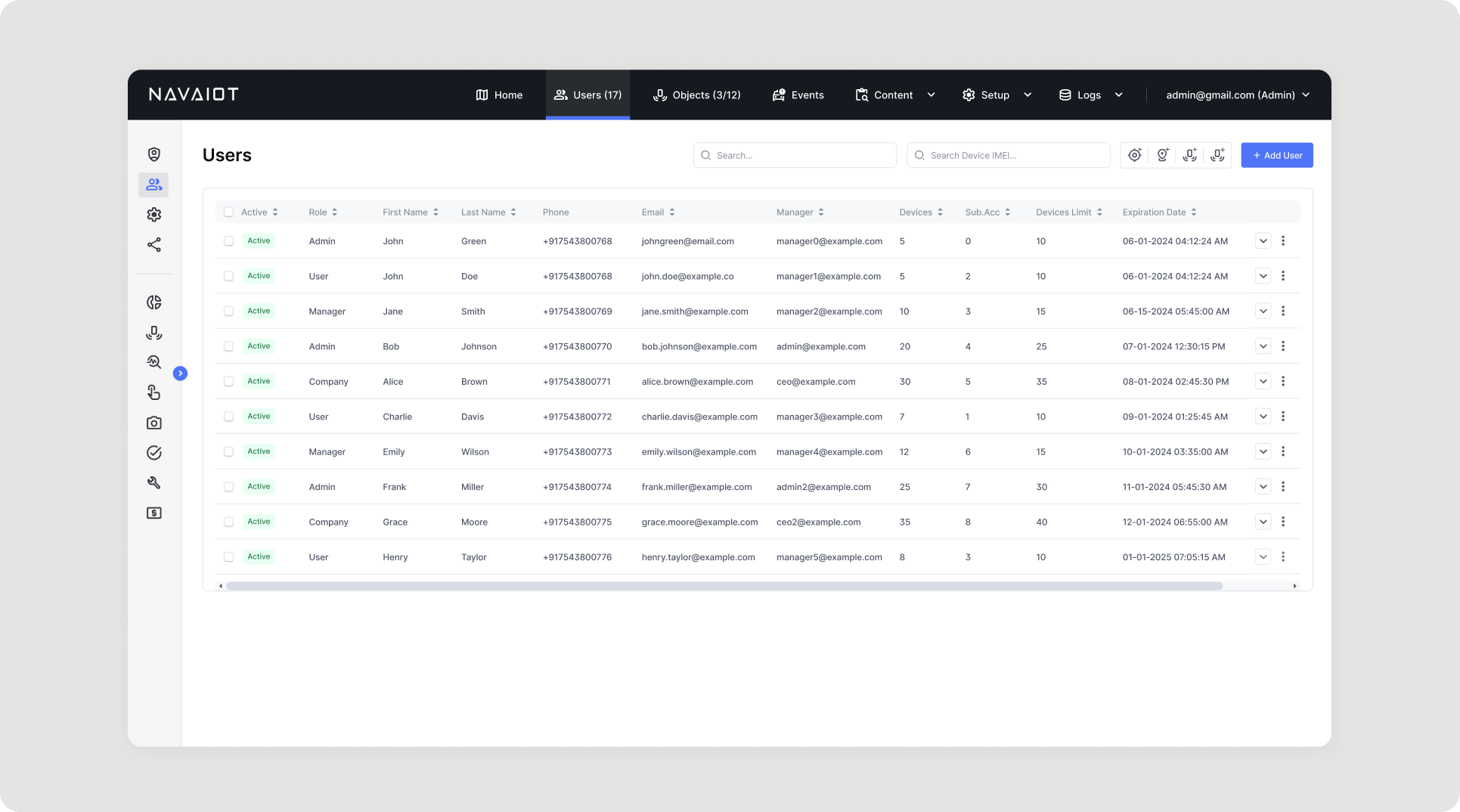
Once the initial design was approved, we began the process of transforming the entire software by building out high-fidelity screens in Figma. We used the selected design option as our guiding visual style, ensuring consistency and clarity across all screens and components.
Solutions to NAVAIOT’s Challenges

A Modern, Eye-Catching UI to Address Design Concerns (Solution to Problem 01)

To resolve the client’s dissatisfaction with the current design, we focused on crafting an engaging and aesthetically pleasing UI for NAVAIOT. We prioritized a modern look, with sleek visuals and a layout that would keep users interested while using the software. The design was not only beautiful but also aligned with the industry’s best practices for usability.
Simplified Navigation & Enhanced User Experience (Solution to Problem 02)

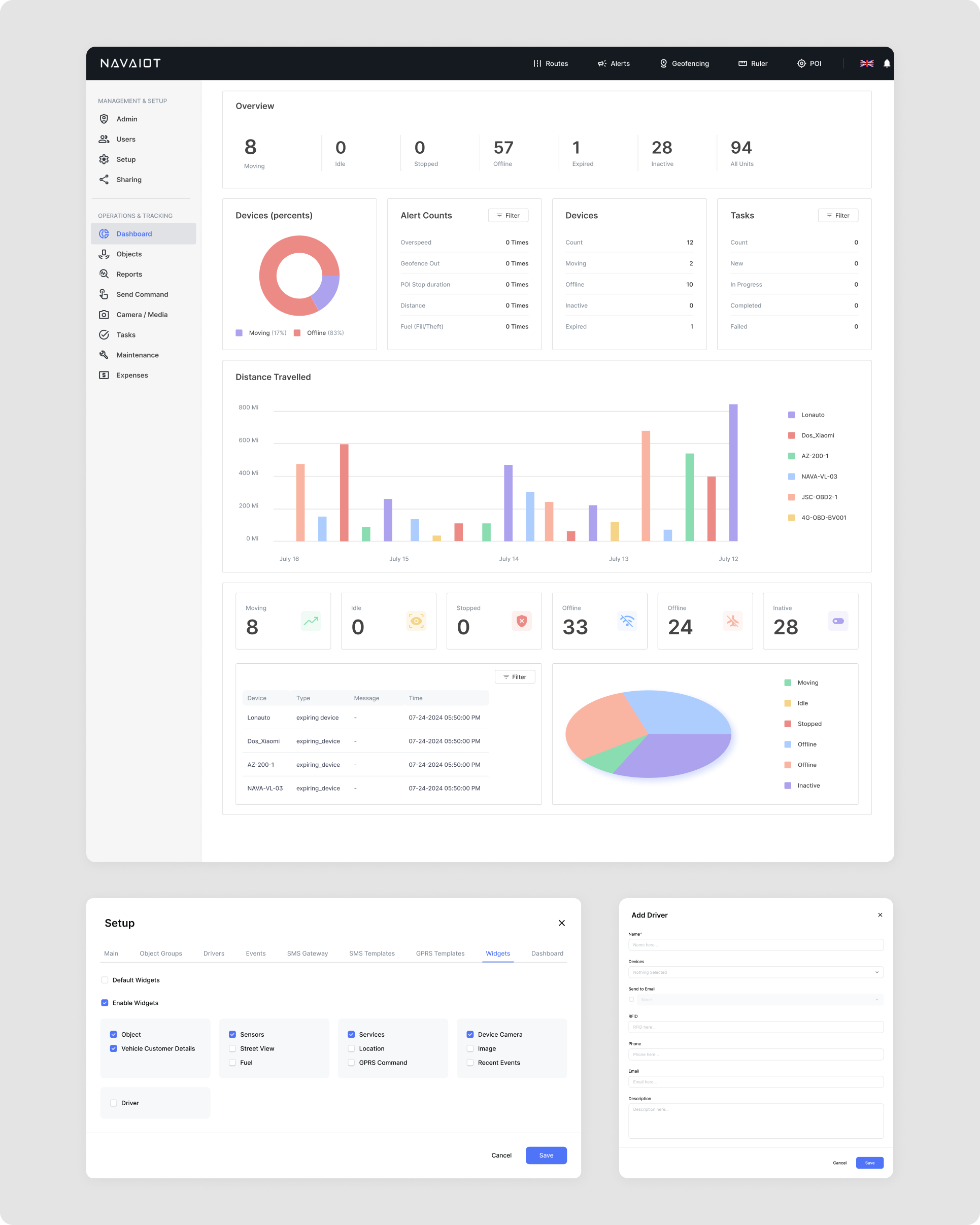
One of our key tasks was to simplify NAVAIOT’s navigation and improve the overall user experience. We reorganized the entire UI, from lists and cards to statistics and navigation flows, ensuring every element was user-friendly and intuitive. By streamlining the user journey, we made it easier for users to access the information they needed, reducing the learning curve for new users.
Code Optimization & Addressing Hidden Issues (Solution to Problem 03)

Our developers worked meticulously to clean up NAVAIOT’s messy codebase. During this process, we discovered several hidden screens and features that the client wasn’t aware of, and which were not part of the original scope. After informing the client, we took these additional screens into account, designing and developing them as part of the solution. By organizing the code and addressing these hidden elements, we ensured the platform was fully functional and ready for future enhancements.
Conclusion: A Complete Transformation of NAVAIOT’s User Experience and Interface

At Qualix Solutions, we successfully transformed NAVAIOT into a modern, user-friendly platform, addressing all the challenges presented by the client. By redesigning the user interface, optimizing the codebase, and improving navigation, we enhanced both the visual appeal and the functionality of the software. NAVAIOT now offers a seamless user experience, attracting new customers and providing existing users with an intuitive, efficient tool for tracking their devices.

Our comprehensive approach—combining UI design, user experience optimization, and backend code improvements—ensures that NAVAIOT is not only more aesthetically pleasing but also more robust and easier to maintain moving forward.s


case studies

See More Case Studies

top features of supply chain management software

What Are the Top Features of Supply Chain Management Software?

  Managing a supply chain with spreadsheets and disconnected systems creates bottlenecks, delays, and costly errors. Whether you’re dealing with inventory shortages, supplier issues, or transportation headaches, the right software transforms these challenges into opportunities for efficiency and growth. This guide breaks down the essential features you need when evaluating supply chain management software tools, helping you choose a solution that actually solves your problems. Why Supply Chain Management Software Matter? The importance of supply chain management software goes beyond tracking inventory. Modern software operations eliminates visibility gaps, automates manual processes, ensures compliance, and enables proactive decision-making across your entire network. Supply chain management in the software industry has evolved into sophisticated platforms that connect suppliers, warehouses, carriers, and customers in real-time. These software tools reduce operational costs while improving delivery performance and customer satisfaction. Top Features of Supply Chain Management Software 1. Real-Time Inventory Control Supply chain inventory management software needs robust tracking across all locations. Your system should monitor stock levels in warehouses, stores, trucks, and ships simultaneously. Look for automated reordering that triggers purchases when stock runs low. The best systems adjust these triggers based on sales patterns and upcoming promotions. For regulated industries, serial number and lot tracking becomes mandatory. When quality issues arise, you can trace affected products instantly and execute targeted recalls. Cycle counting features maintain accuracy without shutting down operations. The software schedules regular counts for different sections, catching discrepancies before they balloon into major problems. 2. Demand Forecasting and Planning The capabilities of systems shine in demand prediction. Advanced algorithms analyze sales history, seasonal patterns, and market conditions to forecast future needs. Scenario planning lets you test different strategies before committing resources. Model what happens if a key supplier fails, demand spikes unexpectedly, or new competitors enter your market. Collaborative forecasting pulls insights from sales teams, major customers, and suppliers. This consensus approach beats pure statistical methods because it incorporates market intelligence that data alone misses. 3. Supplier Performance Management Software must track supplier reliability. Performance scorecards measure on-time delivery, defect rates, and responsiveness to issues. Risk assessment tools flag suppliers who pose threats to your operations—whether from financial instability, geographic concentration, or lack of backup options. Supplier portals streamline communication. Vendors access forecasts, submit quotes, and update shipment status directly in your system, cutting email chains and phone calls. 4. Procurement Automation Supply chain tools and techniques for procurement eliminate manual bottlenecks. Automated workflows route purchase requests through approval chains based on dollar amounts and budget availability. E-sourcing features manage RFQs and bids digitally. Compare proposals side-by-side and award contracts based on objective criteria rather than relationships or convenience. Spend analytics reveal purchasing patterns. You’ll spot opportunities to consolidate vendors, negotiate volume discounts, and stop unauthorized spending. 5. Transportation Planning and Execution Logistics management software features optimize how goods move. Multi-modal planning finds the best combination of trucks, trains, ships, and planes based on cost, speed, and reliability requirements. Carrier management tools compare rates, book shipments, and track performance across your transportation network. Freight audit capabilities catch billing errors and overcharges automatically. Load optimization fills vehicles efficiently by considering weight limits, volume constraints, and delivery sequences. Better utilization means fewer trips and lower costs. 6. Warehouse Integration While inventory management software handles strategic decisions, warehouse integration manages daily operations. Systems direct workers along optimal picking paths and suggest the best storage locations for incoming products. Wave planning batches orders intelligently for release to the warehouse floor. Labor tracking identifies productivity patterns and training opportunities. 7. Cloud-Based Architecture Cloud based supply chain software delivers flexibility that on-premise systems can’t match. Access your data from anywhere, scale up or down based on seasonal needs, and skip the hardware maintenance headaches. Automatic updates keep you current with new features and security patches. Implementation happens faster because there’s no infrastructure to build. 8. Analytics and Reporting SCM functionality requires strong analytical tools. Dashboards show different metrics for warehouse managers versus executives. Exception alerts notify you when performance falls outside acceptable ranges. Predictive analytics spot trends before they become problems. Historical analysis reveals long-term patterns that shape strategic planning. 9. Order Fulfillment Management Order promising gives customers accurate delivery dates based on current inventory and production capacity. Allocation logic prioritizes high-value orders and reserves inventory appropriately. Drop-ship and cross-dock support offers fulfillment flexibility. Modify in-flight orders when possible to accommodate customer changes. Returns management handles reverse logistics efficiently—from initial authorization through restocking and credit processing. 10. Global Trade Compliance For international operations, compliance features prevent costly mistakes. Automated documentation generates commercial invoices, certificates of origin, and export declarations correctly. Restricted party screening checks customers and suppliers against government denied-parties lists. Duty optimization analyzes different scenarios to minimize customs charges through smart classification and valuation. 11. Quality Control Integration Elements of supply chain management include quality assurance. Track non-conformances, document corrective actions, and measure supplier quality trends over time. Certificate of analysis management ensures raw materials and finished goods meet specifications before they move through your supply chain. 12. Financial Visibility Top supply chain management software companies integrate financial tracking throughout. ERP connections synchronize activities with accounting for accurate costing. Working capital optimization identifies ways to improve cash flow—whether through inventory reduction, extended payment terms, or faster collection cycles. 13. Collaboration Tools Modern tools and techniques emphasize connectivity. Supplier portals enable self-service access to forecasts and order status. Internal messaging keeps teams aligned without endless email threads. Document management centralizes specifications, drawings, and certificates. Workflow automation routes approvals to the right people based on business rules. 14. Mobile Access Supply chain monitoring software supports workers wherever they are. Warehouse staff use mobile apps to scan barcodes and confirm tasks. Managers approve requests from their phones. Executives check dashboards during meetings or while traveling. Offline capabilities let work continue in areas with poor connectivity, syncing data when connection returns. 15. Intelligent Automation Leading software product for SCM solutions incorporate automation that learns from patterns. Demand sensing detects shifts in buying behavior faster than traditional forecasting. Process optimization

Learn more
Contact us

Partner with Us for Comprehensive IT

We’re happy to answer any questions you may have and help you determine which of our services best fit your needs.

Your benefits:
What happens next?
1

We Schedule a call at your convenience 

2

We do a discovery & consulting meeting 

3

We prepare a proposal 

Schedule a Free Consultation