Benefits of CRM Software for Nonprofit Organizations

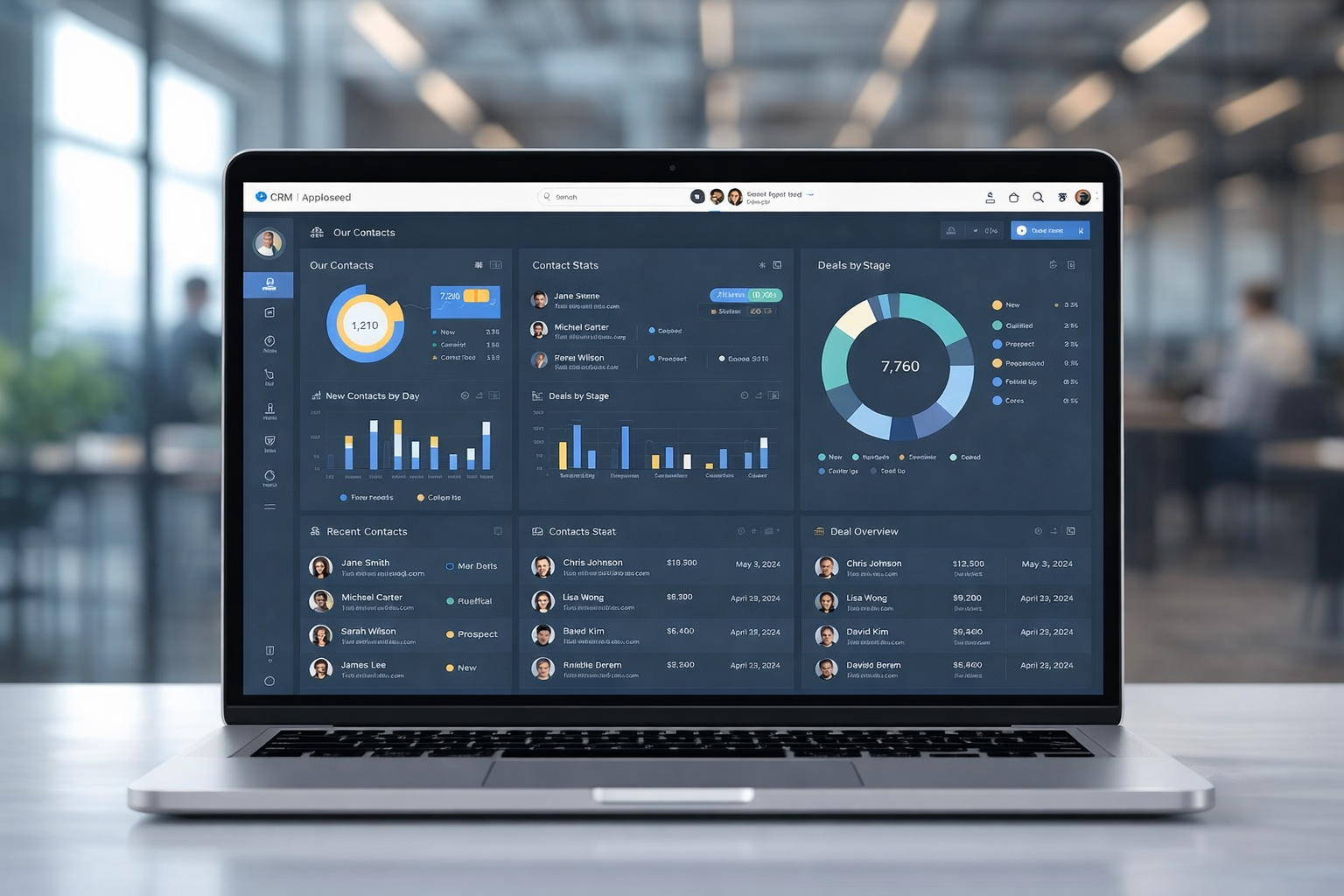
sleek laptop displaying a CRM software dashboard for nonprofit organizations. The screen shows various charts, donor statistics, and campaign performance insights
In today’s competitive and resource‑constrained environment, understanding the benefits of CRM software for nonprofit organizations has become essential for mission‑driven teams aiming to operate more effectively and create lasting impact. Nonprofit CRM systems are far more than digital address books — they transform how charities and nonprofit organizations manage relationships, communicate with supporters, drive fundraising outcomes, coordinate volunteers, and measure results. With donor behaviour shifting, expectations rising, and reporting requirements becoming more demanding, adopting a robust CRM is no longer optional — it is a strategic necessity.

This article explores how nonprofit CRM software works, the tangible advantages it delivers, and the ways organizations can leverage CRM tools to strengthen engagement, boost productivity, and accelerate impact.

What Is CRM Software for Nonprofit Organizations?

CRM stands for Constituent Relationship Management. In the nonprofit context, a CRM system centralizes and manages information about every person and organization that interacts with your cause — from donors and volunteers to beneficiaries, partners, and stakeholders. Unlike CRMs built for commercial sales teams, nonprofit CRMs are tailored to track donor history, gifts, volunteer activity, event participation, campaign engagement, and program outcomes.

At its core, a nonprofit CRM creates a single, centralized repository for constituent data, eliminating scattered spreadsheets and fragmented records. All engagement history, interaction data, communication preferences, and financial records are stored in one system that can be shared across teams and departments.

1. Centralized Data and Better Constituent Insights

One of the most significant benefits of CRM software for nonprofit organizations is the ability to consolidate all supporter and constituent data under one roof. Without a CRM, nonprofits often rely on disjointed tools, email lists, spreadsheets, paper files, which leads to data silos, outdated information, and a lack of visibility across the organization.

A CRM system collects data in real time and makes it accessible to every authorized user. When donor history, volunteer activity, campaign responses, and communications are all in one place, nonprofit teams can:

  • Gain a comprehensive understanding of supporter behaviour.
  • Personalize outreach based on documented preferences and giving history.
  • Use segmentation to tailor communications to specific groups of constituents.

This holistic visibility enables nonprofits to make data‑driven decisions, target the right audiences with the right messages, and improve cultivation strategies that lead to greater engagement and contributions.

2. Enhanced Donor and Supporter Engagement

Cultivating lasting donor relationships is central to nonprofit sustainability. CRM software equips nonprofit teams with detailed donor profiles that include giving history, communication preferences, volunteer involvement, event attendance, and more. This empowers organizations to deliver meaningful, personalized interactions.

With a CRM, nonprofits can:

  • Tailor communication based on donor behaviour and past engagement.
  • Track giving patterns and identify supporters most likely to renew or upgrade their contributions.
  • Create segmented outreach lists for targeted campaigns such as monthly giving appeals, holiday drives, or stewardship messages.

These personalized engagement strategies strengthen donor trust, increase donor retention, and grow lifetime value, which are all crucial metrics for long‑term success

3. Automation of Routine Tasks

Manual administrative work sucks time and energy out of nonprofit teams, often leaving staff bogged down with repetitive tasks like data entry, sending thank‑you messages, or updating records. CRM software automates many of these routine workflows, freeing staff to focus on high‑impact initiatives.

Automation capabilities include:

  • Scheduled donor acknowledgements and receipts
  • Triggered follow‑ups after donations or event registrations
  • Automatic reminders for pledge fulfilments
  • Campaign progress notifications
  • Integration of donor actions with email automation and reporting tools

By automating routine work, nonprofits reduce human error, improve consistency, and multiply organizational productivity.

4. Improved Reporting and Transparency

Donors, grantmakers, regulators, and boards increasingly demand transparency about how funds are raised, allocated, and measured. CRM systems offer robust reporting tools that make it easy to generate accurate, real‑time reports on fundraising trends, volunteer contributions, campaign outcomes, and engagement metrics.

With advanced reporting nonprofits can:

  • Produce analytics reports for board meetings
  • Support grant applications with hard data
  • Identify fundraising performance gaps and opportunities
  • Track key performance indicators and outcomes against strategic goals

Accurate reporting builds credibility, supports accountability, and reinforces trust with stakeholders.

5. Volunteer Management and Coordination

Volunteers are an indispensable part of most nonprofits, yet managing volunteer schedules, tracking hours, understanding skills, and maintaining engagement can easily become chaotic without the right system. CRM software streamlines volunteer coordination by enabling nonprofits to:

  • Store volunteer profiles and engagement history
  • Track skill sets and preferences
  • Manage schedules and event participation
  • Send targeted communication and re‑engagement reminders

Instead of relying on manual scheduling tools or fragmented email threads, a CRM centralizes everything and helps match volunteers to opportunities that align with their interests — which improves volunteer satisfaction and retention.

6. Fundraising Efficiency and Campaign Tracking

A nonprofit CRM isn’t just an address book — it’s a fundraising engine. The right CRM supports every phase of the fundraising cycle, from prospecting and cultivation to solicitation and stewardship. Features that support fundraising include:

  • Campaign performance dashboards
  • Donation tracking and pledge management
  • Recurring gift processing
  • Segment‑based appeals
  • Integrated online donation forms

CRMs often integrate seamlessly with payment processors, fundraising pages, and marketing tools, providing a streamlined flow from gift receipt to donor record update. This end‑to‑end visibility improves fundraising accuracy, reduces errors, and helps organizations make informed strategy decisions.

7. Integration With Other Key Software

Nonprofit teams rarely rely on a single tool. Instead, operations depend on multiple systems, accounting platforms, event management tools, email marketing services, website donation forms, and advocacy platforms. A modern CRM integrates with these systems, allowing data to flow seamlessly from one tool to another without manual duplication of effort.

Integration offers major advantages:

  • Avoid double entry of data
  • Improve accuracy across systems
  • Give staff a unified view of constituent interactions
  • Support more strategic planning with comprehensive insights

By reducing software silos, CRM integration boosts efficiency and ensures that teams are working from the same source of truth.

8. Program Tracking and Client Management

For many nonprofits, the mission extends beyond fundraising into direct service delivery. Nonprofit CRM software can function as client management software, tracking interactions with program participants, beneficiaries, and communities served. These features help organizations:

  • Store case notes and service histories
  • Manage referrals and outcomes
  • Track participation and progress
  • Produce program impact reports

When integrated with traditional donor management functions, client management modules support service planning, measure impact, and provide data for reporting to funders and partners.

9. Cloud‑Based Access and Remote Collaboration

Most CRMs for nonprofits are cloud‑based, meaning staff and volunteers can access up‑to‑date information from anywhere. Cloud deployment enhances:

  • Remote collaboration
  • Mobile access
  • Data security
  • Scalability and backup reliability

This flexibility supports distributed teams, virtual campaigns, and operations that extend beyond a single physical office, which is increasingly important in today’s interconnected world

10. Accessible CRM Options for Every Budget

While advanced CRM platforms offer enterprise‑grade capabilities, nonprofits with limited budgets can still benefit from free or low‑cost CRM solutions. One notable open‑source CRM is CiviCRM, designed specifically for nonprofits to manage donors, events, volunteers, memberships, campaigns, and reporting without recurring software costs.

Free CRM options help smaller organizations:

  • Centralize constituent data
  • Establish basic engagement workflows
  • Build foundational processes before scaling
  • Avoid upfront technology costs

These options are especially suitable for early adoption or teams testing CRM value before investing in larger systems.

How to Choose the Right CRM for Your Nonprofit
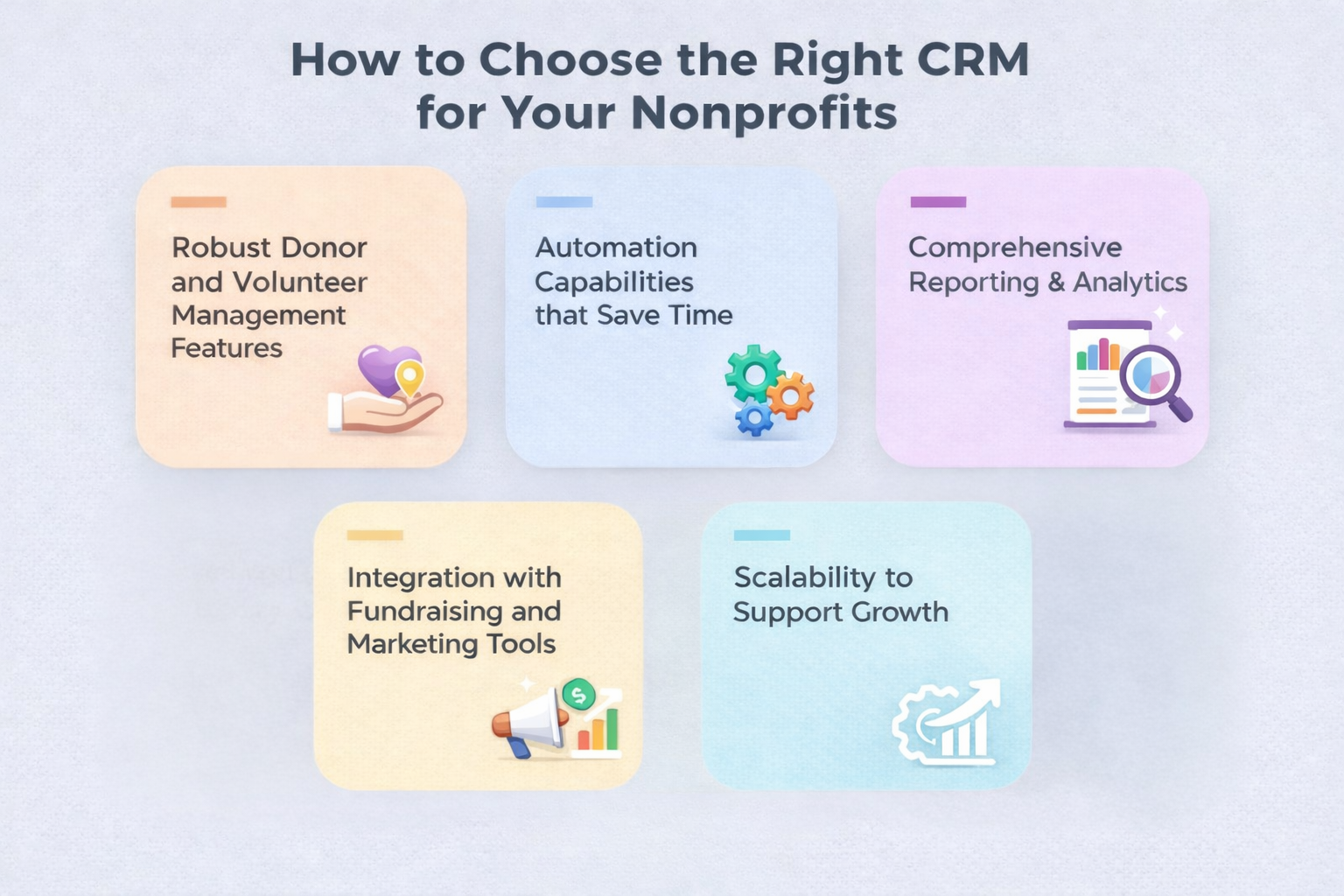
Infographic displaying key features for choosing the right CRM for nonprofits, including donor and volunteer management, automation capabilities, reporting and analytics, integration with fundraising tools, and scalability

Selecting the best CRM depends on your organization’s needs, goals, and budget. Important factors include:

  • Robust donor and volunteer management features
  • Automation capabilities that save time
  • Comprehensive reporting and analytics
  • Integration with fundraising and marketing tools
  • Scalability to support growth

Many CRM platforms also offer nonprofit‑specific pricing, eligibility programs, or tailored workflows to help organizations maximize value. If you need help choosing or implementing the right CRM for your nonprofit, Qualix Solutions offers expert custom software and CRM development services to streamline your processes and support long‑term growth

Best Practices for Successful CRM Implementation

To get the most out of your CRM investment, implement with strategy and intention:

  • Define clear objectives before you begin
  • Clean and standardize existing data
  • Train staff thoroughly on CRM workflows
  • Roll out features incrementally
  • Monitor CRM usage and reporting quality regularly

A phased and structured approach to implementation increases user adoption, improves data quality, and enhances long‑term impact.

Conclusion

The benefits of CRM software for nonprofit organizations go far beyond record‑keeping. A well‑executed CRM strategy supports deeper relationships with donors and volunteers, automates administrative tasks, improves reporting and fundraising effectiveness, and drives strategic insight across teams. By centralizing data, streamlining communication, and enhancing transparency, nonprofits not only operate more efficiently but also deliver greater impact and achieve mission success

Whether your organization is adopting CRM for the first time or expanding to a more powerful platform, the right CRM solution can elevate your engagement, grow your fundraising outcomes, and strengthen your organization’s ability to serve.

FAQs

What is CRM software for nonprofits?

CRM software for nonprofits is a centralized system that tracks donors, volunteers, campaigns, and engagement in one place. It helps teams manage relationships more effectively than scattered spreadsheets or email lists.

Why does my nonprofit need CRM software?

A CRM helps nonprofits reduce manual work, improve donor engagement, automate communication, and gain insights into fundraising and volunteer activity which supports  smarter decision‑making.

How is nonprofit CRM different from regular CRM?

Unlike business‑centric CRMs focused on sales, nonprofit CRMs are built to handle donor giving history, pledge tracking, volunteer management, event participation, and impact reporting.

Can small nonprofits afford CRM software?

Yes, many nonprofit CRMs offer tiered pricing and even free or open‑source options like CiviCRM, making them accessible for organizations with limited budgets.

How do I choose the right CRM for my nonprofit?

Look for a system with strong donor and volunteer management, automation, reporting, and integration capabilities that fit your goals and budget, and consider expert support if needed. 

Relevant Guides & Services
 

Top Features of Supply Chain Management Software

.Net Development Company

Custom Web Development

Custom Mobile App Development

UI/UX Design

Next.JS Development Company

Tags

What do you think?

Leave a Reply

Your email address will not be published. Required fields are marked *

Related articles

what is software development

What Is Software Development? Processes, Types, and Business Benefits for Startups & Enterprises

Is your company’s digital infrastructure merely keeping the lights on, or is it engineered to drive explosive growth? Software development drives one of the fastest-growing sectors in the global economy. Industry reports from Grand View Research estimate the market at over $730 billion in 2024, with projected growth exceeding $1.3 trillion by 2030 at an annual rate of more than 11%. For organizations across the United States, mastering this lifecycle is non-negotiable. It turns vague ideas into precise, functional tools that meet specific business goals and user demands. Modern teams rely on structured frameworks, like the Software Development Life Cycle (SDLC). These interconnected steps ensure every line of code serves a strategic purpose. By leveraging agile methodologies and continuous testing, businesses build scalable, secure systems. These systems deliver long-term value and a formidable competitive edge. This guide breaks down the core processes, various application types, and tangible benefits professional software development brings to ambitious companies. The increasing reliance on software across industries, from cloud computing to artificial intelligence, continues to drive massive global investment, with enterprise software spending expected to approach $1 trillion annually, according to data from Statista. Key Takeaways Software development is a structured process for creating and maintaining digital applications. It powers a massive and rapidly growing global economy. A defined lifecycle (SDLC) is crucial for aligning technical work with business strategy. Modern methodologies help build scalable and secure systems for the future. Professional development transforms digital infrastructure into a key driver of business value. Understanding different software types is essential for selecting the right solution. The ultimate goal is to create efficient tools that meet specific user and organizational needs. Introduction to Software Development The modern business landscape is fundamentally shaped by programmable systems that operate independently of physical machines. These digital instructions form the backbone of everything from utility grids to personal devices. This foundational layer enables the creation of tailored applications. Companies leverage these tools to carve out unique market positions. Setting the Stage for Digital Innovation Digital innovation thrives on automation. Complex tasks are handled by code, allowing operations to scale efficiently. Manual labor costs no longer rise proportionally with growth. This efficiency drives the current 11.7% annual market growth in the United States. The Role of Software in Modern Business Modern enterprises use applications to integrate disparate systems. Seamless data flow between departments boosts organizational efficiency. The role of these programs has evolved. Simple utilities have become complex, cloud-native ecosystems supporting millions of businesses daily. Aspect Traditional Approach Software-Driven Approach Primary Impact Data Management Manual filing, spreadsheets Centralized databases, real-time analytics Faster, accurate decisions Process Automation Repetitive human tasks Automated workflows, bots Lower costs, higher output Customer Interaction In-person, phone calls 24/7 digital portals, apps Improved service, global reach This shift underscores why professional software development is critical. It transforms static infrastructure into a dynamic engine for value creation. What is Software Development: Definition and Scope The global demand for digital solutions underscores the importance of a well-defined creation process. This field involves the comprehensive steps of defining, building, testing, and maintaining applications. It supports a market valued at $429 billion. Understanding the Core Concepts Software engineers and developers collaborate closely. They translate complex business needs into functional code. The final product must align with user expectations. The scope of this work is broad. It includes system, application, and embedded programs. Each type requires specialized programming languages and tools. Effective planning and requirements management are critical. Teams define the project scope before writing a single line. This upfront work prevents costly changes later. Type Primary Function Common Tools & Languages Typical Use Case System Software Manages hardware and basic operations C, C++, Assembly Operating systems, drivers Application Software Performs specific tasks for users Java, Python, JavaScript Web apps, mobile apps, business tools Embedded Software Controls dedicated hardware devices C, Rust, specialized IDEs Medical devices, automotive systems A structured approach ensures products are secure and maintainable. This methodology delivers long-term value throughout the entire lifecycle. The Software Development Lifecycle (SDLC) Explained A structured framework guides every successful project from initial concept to long-term support. This lifecycle, known as the SDLC, provides a roadmap for teams to build robust applications. It standardizes the development process to enhance quality and manage risk. Following these phases ensures the final product aligns with business goals. SDLC Stages: Planning to Maintenance The software development process typically involves seven key phases: Planning: Defining project scope and objectives. Analysis: Gathering detailed requirements. Design: Creating system architecture. Implementation: Writing the actual code. Testing: Identifying and fixing bugs. Deployment: Releasing the application to users. Maintenance: Providing updates and support. Each stage feeds into the next, creating a logical flow. Software engineers rely on this sequence to embed security and scalability early. Best Practices and Process Optimization Modern teams integrate continuous testing throughout the lifecycle. This approach catches defects long before deployment. Regular feedback loops with stakeholders are crucial. They ensure the product evolves according to user needs. Standardizing the deployment maintenance cycle leads to predictable outcomes. It also helps developers meet regulatory requirements efficiently. Comparing Development Methodologies The 2001 Agile Manifesto marked a pivotal shift in how engineers approach complex projects. Teams now select from several established models to guide their work. Each framework offers distinct advantages for managing scope, risk, and delivery. Agile vs Waterfall: Key Differences and a Comparison Table The Waterfall model is a linear, sequential approach. Each phase, like planning or design, must finish before the next begins. This method suits projects with highly stable, well-defined requirements. Changes later in the process are difficult and costly. Agile methodology prioritizes flexibility and customer feedback. Work occurs in short, iterative cycles called sprints. This allows teams to adapt quickly to new information or shifting priorities. It is ideal for dynamic environments. Aspect Waterfall Model Agile Methodology Ideal Project Type Approach Linear & Sequential Iterative & Cyclical Waterfall: Stable specs. Agile: Evolving needs. Flexibility Low; changes are costly High; adapts each sprint Waterfall: Fixed contracts. Agile: Market-driven. Customer Involvement Mainly

Read more
food delivery bicycle courier passing urban restaurant

Food Delivery Companies Payment Comparison 2026

The food delivery industry has grown explosively over the last decade, transforming how millions of people dine and how restaurants operate. Platforms such as DoorDash, Uber Eats, Grubhub, and Postmates (now integrated into the Uber Eats ecosystem) serve as intermediaries that connect hungry customers with local restaurants and independent drivers. However, food delivery companies’ payment structures can be complex. Understanding restaurant commissions, customer fees, payment terms, and real net revenue is essential whether you’re a restaurant owner evaluating profitability or a customer trying to save money. In this food delivery companies payment comparison, we’ll break down how each platform charges, how revenue flows to restaurants, and how customers are billed, including nuances often overlooked in simpler summaries. Key Factors to Consider in Food Delivery Payment Comparisons Before diving into the best food delivery companies payment comparison, it’s important to understand the core variables that affect costs for both restaurants and customers: Restaurant Commissions: Third‑party delivery apps typically charge restaurants a percentage of the order total as commission. These can vary based on plan type and negotiated contract. Processing & Operational Fees: In addition to base commission rates, many platforms charge processing or payment‑related fees, which can further reduce restaurant net revenue. Delivery & Service Fees for Customers: Customers pay delivery fees, service fees, small‑order fees, and sometimes surge pricing during peak times. These vary widely by location and order details. Payout Terms: The timing and method by which restaurants receive payout (weekly, daily advance, or accelerated for a fee) impacts cash flow. Marketing & Promotion Fees: Optional promotional services — such as enhanced visibility or priority listing — can increase a restaurant’s overall cost. 1. Delivery Service Fees: How Much Are They Really Understanding how food delivery platforms charge both restaurants and customers requires moving beyond flat estimates into more realistic ranges based on industry data. DoorDash Restaurant Commissions: Typically around 15 %–30 % per order, depending on which merchant plan the restaurant selects and any promotional add‑ons.  Additional Costs: Optional fees for marketing or enhanced placement can further increase costs.  Customer Fees: Delivery and service fees vary significantly by city, market conditions, and order size.  Payout Options: Restaurants generally receive payouts on a regular schedule, often weekly, but accelerated payout options may be available. Takeaway: DoorDash’s pricing is variable and context dependent, while commission percentages are broad, actual restaurant costs are shaped by contractual choices and optional services. Uber Eats Restaurant Commissions: Generally within a 15 %–30 % range, though some platforms or plans may have tiered fees depending on services chosen. Processing Fees: Some platforms additionally charge processing fees separate from commissions. Customer Fees: Delivery and service fees vary by region and can adjust with promotions or dynamic pricing.  Payout Terms: Typically weekly or at a schedule defined in merchant contracts. Note: Because Uber Eats has a wide global footprint and diverse plan options, exact costs can differ between markets and individual agreements. Grubhub Restaurant Commissions: Grubhub has been known to offer greater flexibility in commission rates. Some plans range from 5 % to 20 % for its marketplace option or a fixed lower rate for direct orders. Processing Fees: May include order processing charges that reduce net income.  Customer Fees: As with other platforms, delivery and service fees vary by region and time of day.  Payout Terms: Weekly or negotiated based on partnership agreements. Takeaway: Grubhub’s structure can be more flexible than others, especially for restaurants that bundle delivery with direct order services. Postmates (Now Integrated with Uber Eats) Restaurant Commissions: Since becoming part of the Uber Eats ecosystem, Postmates typically aligns with Uber Eats pricing structures. Customer Fees: Similar to Uber Eats, with variability based on market factors.  2. Are Delivery Platforms Always Cheaper for Customers There is no single cheapest food delivery app, as costs can vary greatly depending on the location, restaurant partnerships, and the specific items ordered. Real‑World Pricing Variability Data suggests that which app is cheapest depends heavily on location, restaurant partnerships, and the specific items ordered: A recent analysis found that Grubhub was the lowest‑cost option in most U.S. states when comparing popular fast‑food menu items. However, in some metropolitan areas and specific chains, DoorDash and Uber Eats can be cheaper. Overall, dynamic fees and promotions mean price comparison at checkout is the only way to know which is cheapest for a particular order. Why Costs Vary Menu prices: Restaurants may price items differently across platforms. Delivery & service fees: These can change with surge demand and time of day. Promotions & subscriptions: Loyalty programs may reduce or waive fees. Ultimately, order totals can vary significantly even for the same restaurant and the same meal, so customers should compare options before finalizing an order. 3. What Do Restaurants Actually Earn from Delivery Restaurants generally have lower profit margins on delivery orders than on dine‑in due to the added commissions and fees. Typical Profit Impact Most third‑party platforms charge 15 % to 30 % commission fees on delivery orders.  After additional processing and marketing fees, real net margins on delivery orders can shrink substantially, some industry analyses suggest margins fall to 5 %-10 %, much lower than typical dine‑in margins. This means that while delivery orders can boost sales volume and reach new customers, they often deliver less net profit compared to dine‑in sales. Negotiated Rates High‑volume restaurants may negotiate lower commission rates — for example, 18 % to 22 % — especially when they bring significant order volume to a platform.  Hidden and Indirect Costs Some industry analysts suggest that when factoring in all indirect costs such as payment processing, order handling, and channel marketing, the effective cost of delivery to a restaurant can exceed the advertised commission rate.  4. Restaurant Payout Frequency & Cash Flow Payout timing varies by platform and by merchant agreement: Weekly payouts are common. Accelerated or daily payouts may be available for an additional fee or as part of premium plans. Some services offer adjusted payout terms for high‑volume partners. Faster payout options can help restaurants manage cash flow but may come at a cost. 5. Marketing, Promotions

Read more
UI/UX design for business growth in 2026 featuring professionals working on user interfaces, smartphone mockups, wireframes, and growth trend graphs

UI UX Design Services for Business Growth in 2026

In 2026, users judge your business long before they speak to your team. They judge it by how your website, app, or digital product feels to use. If the experience is confusing, slow, or frustrating, they often leave permanently. This is why UI UX design services are no longer optional for businesses that want sustainable growth. UI and UX design directly influence conversions, customer retention, brand trust, and operational efficiency. Businesses that treat design as a strategic function outperform those that treat it as decoration. UI/UX Design From a Business Perspective UI and UX design are often discussed from a creative angle, but their real value lies in business impact. UX (User Experience) focuses on how users move through a product, complete tasks, and achieve goals. UI (User Interface) focuses on how those interactions look, feel, and respond visually. Professional ui and ux design services bring these two disciplines together to reduce friction, improve clarity, and guide users toward action. Practical UI/UX Experience That Drives Results At Qualix Solutions, UI/UX design is shaped by hands-on experience working with real products, real users, and real constraints. Our team designs interfaces for websites, mobile applications, SaaS platforms, and enterprise systems where usability directly affects revenue and adoption. This experience helps us design interfaces that solve problems instead of just following trends. Every design decision is tied to user behavior, technical feasibility, and measurable business outcomes. The Difference Between UI and UX Design A common question businesses ask is what is the difference between UI and UX design, especially when planning a new product. Difference Between UI and UX With Example Consider an online banking app: UX design defines how users check balances, transfer money, and manage accounts efficiently. UI design determines how buttons, colors, typography, and layouts make those actions clear and easy to use. Good UX without UI feels functional but dull. Good UI without UX looks attractive but frustrates users. Growth happens when both work together. Why UI/UX Design Matters More Than Ever in 2026 User expectations in 2026 are shaped by the best digital products they use daily. Anything below that standard feels broken. Strong ui ux design and development services help businesses achieve: Higher Conversions Clear flows, intuitive layouts, and reduced friction lead users toward decisions instead of confusing them. Better Retention Users stay with products that feel predictable and easy. UX builds habits; UI reinforces trust. Lower Support Costs Well-designed experiences reduce user errors, confusion, and support requests. Stronger Brand Credibility Professional design signals reliability and attention to detail without saying a word. What Does a UX/UI Designer Actually Do Many stakeholders still ask, what is a ux/ui designer and what value they bring. A professional ux ui designer is responsible for: Understanding user needs and behavior Designing user journeys and interaction flows Creating wireframes and prototypes Collaborating with developers and product teams Testing and refining designs based on real feedback Experienced ui and ux designers balance user needs, business goals, and technical constraints throughout the product lifecycle. UI/UX Design Trends Shaping Business Growth in 2026 The design trends for 2026 are shifting the focus away from visual novelty and placing more emphasis on usability and performance. As businesses evolve, it’s becoming increasingly clear that effective user interfaces (UI) and experiences (UX) are no longer just about looking good—they need to work well and perform seamlessly. Key UI/UX design trends include: Simpler Interfaces with Fewer Distractions: In 2026, there is a growing emphasis on creating minimalist designs that eliminate unnecessary elements. This approach enhances the user experience by allowing users to focus on essential tasks without being distracted by extraneous content or features. Accessibility-First Design for Broader User Reach: Accessibility has become a top priority, with more businesses designing products that cater to a wide range of users, including those with disabilities. By incorporating accessibility features, businesses can ensure a more inclusive digital experience and expand their reach to a broader audience. Data-Driven UX Decisions: Making informed design choices based on real user data is a crucial trend. Businesses are increasingly relying on data analytics to understand user behavior and optimize their designs for maximum engagement and satisfaction. Consistent Experiences Across Devices: The need for a seamless experience across multiple devices is a priority. Whether users are accessing a website on a desktop, smartphone, or tablet, ensuring consistency in design and functionality is key to keeping them engaged. Performance-Focused Layouts That Load Fast: Fast load times are critical in retaining users. Performance-driven design ensures that websites and applications load quickly, reducing bounce rates and improving user satisfaction. In conclusion, trends matter only when they contribute to usability. Design choices made without a clear purpose rarely deliver tangible results, making it essential to prioritize functionality and performance over aesthetics alone. The Role of Figma in Modern UI/UX Design Collaboration is critical in modern product teams. Figma for UI/UX design has become widely adopted because it supports real-time collaboration between designers, developers, and stakeholders. Figma helps teams prototype quickly, maintain consistent design systems, share feedback instantly and reduce gaps between design and development Using the right tools improves both speed and design quality. UI/UX Design Services vs DIY Design Approaches Some businesses rely on templates or internal teams to save costs. While this can work short term, it often limits scalability. Professional ux/ui design services provide: Research-driven design decisions Custom solutions aligned with business goals Scalable design systems Designs that translate cleanly into development DIY approaches often lead to usability issues that surface only after launch, when fixing them becomes expensive. UI and UX Design Services for Different Business Stages Different business stages require different design strategies. Startups Startups benefit from UX-focused MVPs that validate ideas quickly and avoid unnecessary features. Growing Businesses Scaling companies need consistent design systems that work across products and platforms. Enterprises Large organizations rely on ui ux design and development services to manage complex workflows, security requirements, and large user bases. Custom design adapts to business complexity rather than forcing businesses into rigid

Read more
Contact us

Partner with Us for Comprehensive IT

We’re happy to answer any questions you may have and help you determine which of our services best fit your needs.

Your benefits:
What happens next?
1

We Schedule a call at your convenience 

2

We do a discovery & consulting meeting 

3

We prepare a proposal 

Schedule a Free Consultation